

Scrolling text for OBS: rules, links and top donors
The things you repeat every stream — the chat rules, your Discord link, what tonight is about — kept on screen instead of in your mouth. A list runs across the screen as a line or stands in a corner as a column, and it can fill itself: the top donors for a period you pick, or the cards your carousel can drop. Make as many lists as you need, each with its own content, format, speed and look.
Free — like everything that runs on your own PC.
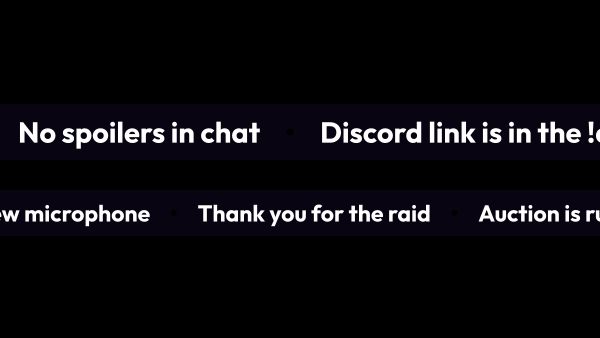
Three sources, two formats, and that is all of them
A list does not have to be typed by hand. Two of the three sources come from the app itself and keep themselves up to date.
- Your own phrases: one per line, running in a loop through a separator you choose.
- Top donors for this stream, the last 24 hours, 7 days, 30 days, a year or all time — counted by the app in your base currency, up to fifty names, and refreshed the moment a donation lands.
- Carousel challenges — the cards your carousel can drop, so viewers see what they are donating for. Cards can be painted in their rarity colours and shuffled.
- A running line goes left or right, endlessly: the strip is assembled from two identical halves and shifted by exactly one half, so there is no seam to catch the eye.
- A column can stand still or scroll downwards or upwards — the way to show a list too long for the frame.
The questions you stop answering
A line on screen answers the chat before it asks, and it answers everyone at once — including the person who arrived two minutes ago and missed you saying it.
- The chat rules, so nobody has to paste them again.
- Your links: the other channel, the community server, where to follow you.
- What tonight is about and what comes after it.
- Who is at the top of the donations right now, without you reading the list out loud.
- What a viewer gets for a donation, if the carousel is running.
What it is not
A list holds text on screen. Anything that has to react to a single event lives in another module.
- Not an alert: nothing pops up when a donation lands — the top donors quietly recount themselves and carry on.
- Not a chat overlay: viewers' messages never get in, the text on screen is yours.
- Not the challenge scoreboard: what stands here is the pool a spin can draw from, and the challenges already in play have an overlay of their own.
- Not an empty strip: a list with no text, or one that is switched off, leaves the scene entirely, bar and backdrop included, and comes back together with its text. There is no source to hide in OBS by hand.
Several lists, each on its own
Lists do not share a link the way alerts share a group — a list takes the whole width of its source, so there is nothing to queue.
- Every list has its own OBS link and its own browser source.
- Speed is set in pixels per second, from 10 to 400.
- A column asks how many rows fit the source: in OBS the height is fixed, so where the list is cut has to be your decision rather than an accident.
- The backdrop, the font and the separator are styled separately, so a rules line does not have to look like a top-donors board.
- Fifteen ready-made looks: Neon, Minimal, Retro and twelve materials that draw the bar itself, from Live pencil to Frosted glass. An outline effect can run around the bar all the time or flash when its content changes, for example when the top donors shift.
- A look you liked is saved as a template and applied to your other overlays.
Watching it work
The editor shows the real overlay rather than a drawing of it. What you change there lives in the editor until you press Save — and once you do, it is in OBS without you touching the browser source.
- The preview runs at the speed you set, inside a frame the size of your browser source: pick the size under it in “Source size”, zoom with + and -, and padding moves the bar exactly as it will in OBS.
- Saved edits reach OBS on their own: the browser source never has to be refreshed.
- Switching a list off takes it off the screen at once, bar and all, and switching it back on brings it back.
- If OBS runs on a second computer, the link already carries this machine's network address. Switch local network access on in Settings → Core.
What it is made of
Each part is a separate module: you install only the ones you need, and any of them can be removed without breaking the rest.
Getting started
- Open Widgets → Lists, create a list and pick where its content comes from: your own text, top donors, or the cards your carousel can drop.
- Choose the format — a line running across the screen or a column standing in the corner.
- Copy its link from the table and add a browser source in OBS.
- Style it next to the live preview, and reuse the same look in your other overlays.
Make the browser source as wide as your scene: a running line is drawn across the full width of the source and centred in it vertically, so the height only has to fit the bar. With an outline effect, leave it some room: give the source a little more height than the bar and set “Left and right” in “Edge padding”, or the effect is cut off at the edges.
Works together with
Get strAImer
Everything on this page runs on your own computer — free, no account, nothing to connect.
Missing something here? Ask for it on the ideas board — votes show what people need most. Propose an idea