

Donation carousel: viewers spin your next challenge
Donations fill a bar. When it fills, a ribbon of cards rolls across your stream, stops on one of them, and whatever it landed on goes onto your challenge list — with a counter or a countdown, live in OBS. It is for streamers whose chat already dares them to do things, and who would rather those dares were paid for, shown on screen and counted than forgotten by the next game.
Free — like everything that runs on your own PC.
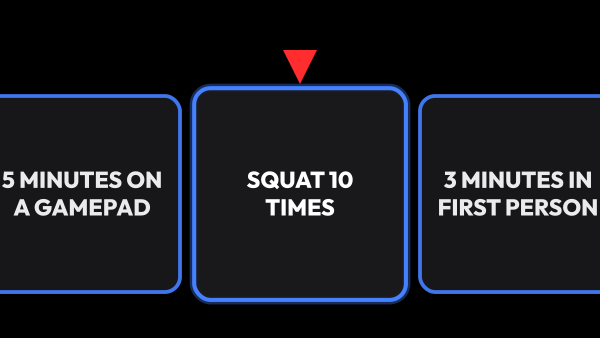
The donation goal is reached — the carousel spins
What your viewers see
The whole thing is one loop, and it reads without explanation: money goes in, the bar climbs, the ribbon rolls, a card wins. Nobody has to be told what is happening — they watch it happen.
- The bar shows how much is collected and how much is left until the next spin, so a viewer can see that their donation is what tips it over.
- When it fills, the ribbon rolls across the screen and slows to a stop on a card — the same way a case opening does.
- The bar itself names who tipped it over and what they got — for a few seconds it shows that in place of the amounts, so the person who paid is named on screen.
- Everything that comes up stacks on the challenge list: counters for the things you do, countdowns for the things you endure.
- One big donation can pay for several spins at once: they queue up, and the ribbon keeps rolling until the queue is empty.
- The bar and the challenge list can take any of twelve themes under Material, and an Outline effect can run around them all the time or flash when a card drops or a new challenge comes up on the list.
What goes on the cards
A card is a thing you might have to do: play the next hour with no HUD, take a request from chat, drink something the chat chose. Cards live in groups, and the group decides how often it comes up.
- Each group has a rarity, and rarity sets the odds — a legendary card is rare because you made it rare, not because of a number you have to compute.
- The colour of a card follows its rarity, so an expensive drop is recognisable before anyone reads it.
- A series creates a whole run of numbered cards from one template, for the times a challenge is 'do it once more'.
- A card can carry a counter — times, minutes or a percentage — and a card without one is simply announced and goes into the history.
- Any card, and any whole group, can be switched off instead of deleted, so a set that belongs to a different kind of stream waits rather than disappears.
The odds are readable, and the deck keeps itself fresh
Six rarities, from common to artifact, and the one a group carries decides how often it comes up. The rest of the settings here keep a long evening out of the same three cards.
- Every group shows its own chance next to it — how often it comes up is a number you read, not one you work out.
- Switch on no repeats and a card leaves its group's deck until the rest of the group has been through.
- A guarantee ends a dry run: after a number of spins you set, the next card is forced to be at least the rarity you named.
- Groups can switch themselves on by the game you are playing — one set for GTA, another for shooters, with a button that adds whatever you are streaming right now.
- Twitch and Kick report the game, YouTube does not, so there the groups stay on the switches you set by hand.
- It spins before you have set anything up: three groups of ready-made cards come with it, and they are renamed, edited or thrown away like any others.
The threshold rises, and it drops when it is quiet
A fixed bar goes stale in one evening: the first spin is exciting, the tenth is arithmetic. Two settings keep it from flattening out.
- The threshold can rise with every spin, so the tenth challenge of the night costs more than the first.
- When donations stop coming for a while, the threshold quietly comes down for a time and the bar says so — an evening that went quiet gets a way back instead of standing still.
- The discount only runs while you are live, so an overnight gap does not hand out a free spin to whoever tips first in the morning. A carousel switched off on its tile does not start one either; a discount that was already running when you switched it off finishes its time.
- All amounts are in your own base currency, and the pool follows whatever donation services you have connected.
- Twitch bits count towards the pool unless you switch them off, and a donation that arrived past the platforms is added to it by hand.
- Or leave the bar out of it and spin only when you press the button — the pool keeps filling and waits for you.
The challenge list keeps score
A challenge that comes up and is forgotten was not a challenge. The list is the memory: it sits in OBS and it survives a restart.
- A counter line grows every time the same card comes up — five push-ups, then ten, then fifteen.
- Lines stack by the name of the counter rather than by the card, so three different cards that all mean push-ups make one number instead of three.
- A countdown line runs on screen and makes a sound when the time is up, so chat knows before you do.
- A countdown that ran out does not disappear: the line stays, marked as out of time, until you say it is done.
- Timers keep counting through an app restart, so a crash mid-stream does not wipe what you owe.
- You can mark a line done, edit the number or add your own from the control panel without leaving the stream.
Running it while you play
Everything you need mid-stream is on a control panel tile, on the second monitor — not in a settings window you have to alt-tab into.
- The tile shows the bar, the queue of spins waiting to play and the cards that came up last.
- One button spins right now, for the times you want to hand out a challenge yourself.
- The challenge tile starts and pauses timers and edits the numbers in place.
- The power button stops the whole thing — donations stop filling the pool, spins stop and the overlays go dark — without erasing what has already been collected.
- Each ribbon, bar and challenge list also has its own On air switch in the overlay list. It takes only that overlay off the stream: the pool keeps collecting, spins go on and timers keep running, so viewers can still pay for spins they do not see.
- Reset empties the pool and the queue, for the evening that starts over.
- Both tiles are the same data as the OBS overlays — change it on the panel and the overlay follows.
What it is made of
Each part is a separate module: you install only the ones you need, and any of them can be removed without breaking the rest.
Getting started
- Open Module Catalog → Add-ons and install the carousel: the engines, the overlays and the panel tiles come as one set.
- Connect a donation service, so there is something to fill the bar with.
- Open Carousel → Carousel, write the cards, put them into groups and give each group a rarity.
- Set the threshold, and decide whether it rises with every spin.
- Put the ribbon, the bar and the challenge list into OBS as browser sources.
- Add the two tiles to the control panel and run the evening from there.
The carousel and the challenge list are separate modules on purpose: a stream that wants the spin without keeping score leaves the challenge overlay out of OBS, and a stream that only wants the score fills the list by hand.
Works together with
Get strAImer
Everything on this page runs on your own computer — free, no account, nothing to connect.
Missing something here? Ask for it on the ideas board — votes show what people need most. Propose an idea