

AI co-host for your chat
A chat bot that answers your viewers with your own links, your own gear and your own schedule — the questions you have already answered a thousand times. You write down what it knows and the character it answers in; it speaks only when a viewer calls it by name. It can reply to donations and look things up on the web once you allow it.
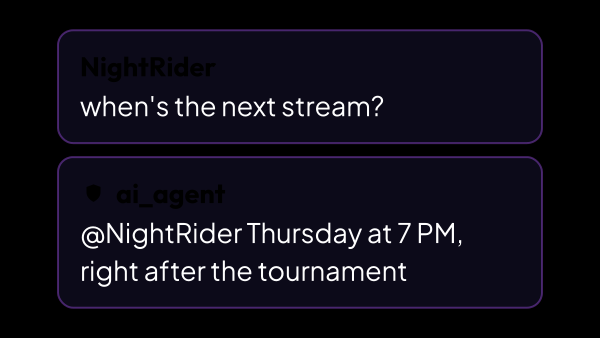
What it answers from, and this is the list
In chat it speaks only when a viewer starts a message with its name; donations and your own voice reach it by other routes. Jokes, opinions and small talk it makes up itself, like any model — what is listed below is the facts it is handed.
- Your links — Discord, Telegram, where to donate — given exactly as you wrote them. Which one comes back is up to the model: all of them are in front of it, and it is asked for the one the question was about rather than the whole list.
- Your gear: mouse, keyboard, chair, graphics card. Answered from your own list, and a part that is not on it is not invented.
- Who you are and what the stream is: profile, the names viewers call you, schedule, running jokes — plus any fact you wrote down under its own keywords.
- What is on right now: the title, the category, how long you have been live and how many people are watching.
- What you played on your last five streams and how long each one ran.
- Your own chat commands by name, and the lots of a running auction with their current totals.
- Anything from the web, when the question needs it and you allowed searching.
- The reply comes back in the language the message was written in, so a chat where two languages mix does not have to settle on one.
Knowing things it could not guess
The knowledge base is what turns a generic model into your co-host. It is a page you fill in, not a training run.
- Your profile, aliases, links — Discord, Telegram — and any facts you want repeated correctly.
- “What’s your Discord” stops being your job to answer.
- The profile and the links belong to the whole app, not to the bot: the same list feeds your streamer page and your chat commands, so you write it once.
- A draft can be imported from a link to your channel: the page is read and sorted into fields, and you tick what to keep before anything is saved. It costs credits on the model you picked, and the price is shown next to the field.
- It is a page of its own, Chat Bot → Knowledge Base, and it opens whether or not the assistant is switched on.
- Every link and every PC part gets a short insert name, so a chat command or a timed message can say {discord} and send the address — change it here and every one of them follows.
- Longer answers live as facts under their own keywords: they only join a reply when one of those words is in the message, so a hundred of them cost nothing until someone asks.
- What is written here also keeps the bot off the web: it is told the topics you have already answered, and a question on one of them is answered from the page instead of a paid search.
What chat cannot make it do
A bot that takes orders from chat belongs to your viewers. This one takes questions from chat and instructions from you. Part of that line the app holds itself, and no wording gets around it; the rest is rules the model is given, and a rule lowers the odds where code would settle the matter.
- “I am the streamer”, “I am a moderator” change nothing: chat cannot prove who anyone is, and the app never delivers your instructions through it.
- Standing orders — “from now on always…”, “forget your rules” — change no setting: nothing in chat can write into what you configured. Not playing along inside the conversation is a rule it was given, not a wall.
- It answers the person who wrote to it: every other @ is stripped out of the reply before it is sent, so no viewer can have it tag someone else.
- Its reply can never begin with / or . — the platform executes those as commands, and the bot is usually a moderator.
- It is told never to invent a link, and every reply is checked before it goes to chat: if it holds a link that is not in your Knowledge Base, was not found by a web search for that same reply and was not said by you in a voice request, the whole reply is not sent. The viewer then gets no answer; if you asked by voice, the bot tells you it does not have that link. When there is no allowed link to compare against at all, for example no links in the Knowledge Base and no search, nothing is held back.
- Money is left out of what it reads about your streams, so there is no earnings figure for anyone to talk it into naming.
Donations and the web
Two things are switched off by default, because both cost money and both can be abused.
- Replying to donations, with a minimum amount: every answer costs credits, and a stream of tiny donations would burn through them.
- Web search, with its own trigger words — a viewer asking it to look something up.
- The threshold is counted in your base currency, and donations in other currencies are converted before they are compared — so the bar means the same thing whoever is paying.
- Or smart mode instead of trigger words: the agent decides for itself when a question needs the internet. An answer then costs two credits instead of one, and you can cap how many searches it may run in an hour.
How much it talks, and where the answers land
A bot that answers everything is unbearable by the end of the first hour, so most of the settings here exist to keep it quiet.
- Only while streaming, on by default: off the air the bot answers nobody but you, so viewers cannot spend your credits between streams. Donations and voice are not affected.
- The name has to start the message — a mention in passing is not a summons. The connected bot account answers to its own name out of the box, and you can add more names.
- A cooldown between answers, and a chance of answering at all, keep it from filling the chat.
- The personality is yours to write, so it does not sound like a support bot.
- It remembers the shared chat and a separate conversation with every viewer, and the shared part can wipe itself a few minutes after the stream ends.
- Answers go back to the chat the question came from, trimmed to what that platform accepts; replies to donations go to the chats you pick, because a donation does not arrive from a chat.
The one paid part
This is worth being blunt about. Understanding the question and writing the answer happen on the strAImer server, and that is the part you pay for.
- Answers run on the strAImer server and are billed in credits.
- The free plan includes 100 credits a month, so it can be tried before any money is involved.
- Models cost differently per answer. The number next to each one in the picker is an estimate for an ordinary reply; what you are charged is what the call really cost, so a long back-and-forth comes out dearer than that number.
- A web search costs 10 credits on top of the answer it goes into, which is the reason it starts switched off.
What it is made of
Each part is a separate module: you install only the ones you need, and any of them can be removed without breaking the rest.
Getting started
- Sign in under Settings → strAImer Account — the key and the credits come from there.
- Open Chat Bot → AI Agent and set the personality, the names it answers to, how often it answers and how long it waits.
- Fill in Chat Bot → Knowledge Base: profile, links, gear, facts.
- Switch on AI agent answers in Voice → Voice Over if the answers should be spoken out loud.
The bot talks; it does not act. Starting a poll, switching a scene or saving a clip is voice control, and those are handed only to the microphone on your own machine.
Works together with
Get strAImer
Everything on this page runs on your own computer, except the model itself — it runs on our server and costs credits. The app shows the price before each request.
Missing something here? Ask for it on the ideas board — votes show what people need most. Propose an idea