

Chat commands and timed messages, on every platform at once
The answers you repeat every stream, written once — and the reminders that post themselves, but only when there is someone in chat to read them. One command answers on Twitch, YouTube and Kick alike, and all of it lives in the app on your own computer instead of someone else’s web panel.
Free, except the AI part — that one runs on our server and costs credits.
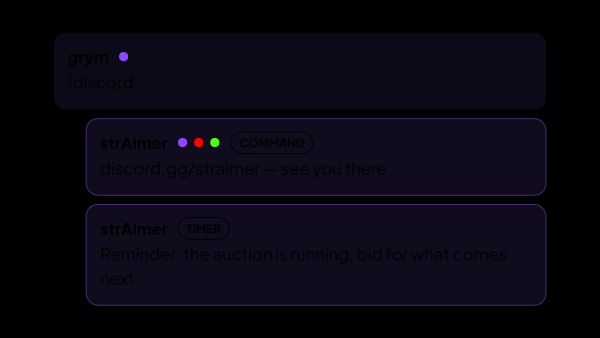
One command, every chat you are connected to
A viewer types !discord on Twitch, YouTube or Kick and gets the same answer from the same place. Nothing has to be set up three times.
- Text commands with as many aliases as you need: !discord, !dis and !ds all reach the same answer.
- Or no exclamation mark at all — a command can fire on a plain word anywhere in a message.
- A cooldown for the whole chat, a separate one for each viewer, and an exemption from both for you and your moderators.
- Who is allowed to run it: everyone, subscribers, VIPs, moderators, you.
- The bot answers before you have written anything: !commands is there from the first run and lists the rest.
Answers that are not the same text every time
The answer is a template, not a fixed string, and what goes into it is worked out at the moment the command fires.
- Built-in values: who asked, who they pointed at, how many times the command has run, the time, the date, a random number, a random pick from a list, simple arithmetic.
- Your own variables — a name and a list of values, one taken at random: {food} answers pizza, sushi or a burger.
- Your links by name. The Discord invite is written down once, and when you change it every command and every timer follows.
- {auction_rules} pulls the text straight out of your auction settings, so chat never reads yesterday’s copy of the rules — that one asks for the Auction set, a free separate install from the module catalog.
- {commands} lists the commands that are switched on right now — it is built as the answer goes out, so it cannot go stale.
A command that knows when to keep quiet
Half of what you repeat only makes sense some of the time. A command can be tied to one condition, and say something else — or nothing — when it is not met.
- Only while you are playing one of the games you listed, matched loosely, because the platforms spell the same game differently.
- Only while you are live — or only while you are not; and, if you installed the Auction set, only while an auction is running.
- When the condition fails the command either answers differently or stays silent, and silence does not burn the cooldown.
Timed messages, without talking to an empty room
A reminder posted into a dead chat is worse than no reminder. Activity is part of the rule, not an afterthought.
- Messages rotate through a group, with a separate queue per platform.
- Below your minimum chat activity the message is skipped — and activity is counted per platform, so a busy Twitch does not carry a silent YouTube.
- The bot’s own messages do not count as activity, so a group cannot keep itself awake in an empty chat.
- A group can also wait for a game — or for a running auction, if the Auction set is installed — and it can be held to the hours you are actually live.
- Any single message can be sent right now by hand, when you need it out of turn.
Getting past anti-spam
Platforms drop messages that repeat word for word. That is the one place the AI earns its keep in this section.
- Any single message can be rephrased by AI each time it goes out.
- It is per message, not per group: the ones that repeat most often are the ones that need it.
- The links in the text and the two things a timer substitutes — your Knowledge Base names and {auction_rules} — are hidden from the model and put back afterwards, so a rewrite cannot mangle them.
- Rephrasing is the only thing on this page that spends credits, and it stays off until you switch it on.
- If the AI cannot be reached, the original text goes out — a timer never falls silent because of it.
Not a bot living in someone else’s panel
Cloud bots keep your commands on their service and answer from their own account. Here the same work happens inside the app you installed.
- Your commands, your variables and your timers are stored by the app on your own computer.
- Answers go out through the account you connected yourself — your own, or a bot account you made for the channel.
- It still needs the internet, of course: the chats live on Twitch, YouTube and Kick, and that is where the answers go.
- Out of everything on this page, the only thing that reaches our servers is the text of the messages you switched rephrasing on for. The app itself also checks for updates and reads the module catalog, as any installed program does.
What it is made of
Each part is a separate module: you install only the ones you need, and any of them can be removed without breaking the rest.
Getting started
- Open Chat Bot → Chat Commands and add the answers you repeat most often.
- Open Chat Bot → Knowledge Base and put your links there once, then call them by name from any command or message.
- Open Chat Bot → Chat Timers and create a group: interval, minimum chat activity, platforms.
- Add the messages that rotate inside it, and switch AI rephrasing on for the ones that go out most often.
Everything here works the moment you have filled it in — the AI half stays off until you turn it on, message by message.
Works together with
Get strAImer
Everything on this page runs on your own computer and is free, except the AI part — it runs on our server and costs credits, and the app shows the price before each request.
Missing something here? Ask for it on the ideas board — votes show what people need most. Propose an idea