

A spin wheel, card strip or slot machine for OBS with lots of your own
A random pick on screen from options you set: a dare, a prize, the next game. Choose a wheel, a strip of cards or slot reels; it spins by itself a few seconds after its scene goes live and stops on one lot. Weights set the odds, and each slot reel can have its own list, so the reels build a phrase like where, what and how many times.
Free — like everything that runs on your own PC.
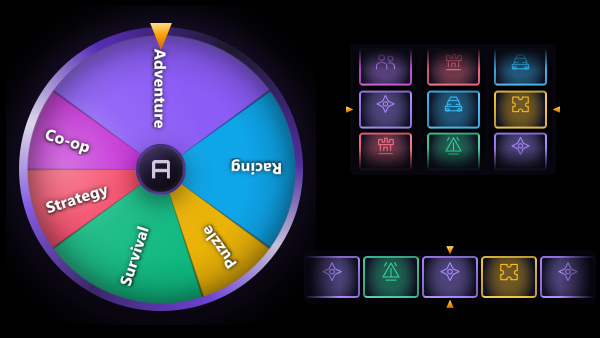
Three formats, one set of lots
Every widget has its own lots and its own format, and the format can be switched later without retyping anything.
- Wheel: every lot is a sector, as wide as its weight, and the wheel stops under the pointer.
- Card strip: the lots are cards sliding past a pointer; a lot with more weight appears on the strip more often.
- Slots: three, four or five reels stop one after another, with a pause you set between them. The reels can match like a real slot machine, or you can allow no repeats or no more than two of a kind.
- Each reel its own list: give every reel its own lots and a name above it, and the result reads as one phrase, for example in the kitchen · do ten squats · right now.
- Pictures on the cards of the strip and the slots, with the lot name over the picture, under it or not at all.
What streamers use it for
Anything you would otherwise decide with a coin or a random number generator, but on screen, where the viewers see it happen.
- Which game, map or character comes next.
- A dare or a forfeit, with the rare ones given less weight.
- A prize among the options you set for a giveaway.
- A challenge put together from parts on separate reels.
- A break between rounds that keeps the scene alive while you get ready.
When it spins
There is no button to press on stream: the spin starts when the scene with the widget goes live.
- A few seconds after the scene goes live it spins once; the delay is yours to set, zero included.
- Hide the source and show it again, or switch scenes and back, for another spin.
- In OBS studio mode it waits for the transition to the programme, not for the preview.
- The same link open in two places shows the same result in both.
- The result stays on the plaque until the source leaves the live scene.
What it is not
A spin wheel picks one lot out of yours. Everything around it lives elsewhere.
- Not a viewer game: nobody bets channel points on it, and there is no chat command to spin it.
- Not the auction wheel: there are no bids, the odds are the weights you typed.
- Not a donation trigger: it does not spin on a donation, only when its scene goes live.
- No history: the result is shown, not stored.
Look and sound
The same styling tools as the other strAImer overlays, with a live preview and a test spin that never reaches the stream.
- Five ways to colour the lots: automatic, a colour per lot, two colours, shades of one colour and a rainbow.
- A result plaque under the figure with your own caption, themes for the plaque and an outline effect around the figure.
- A click as sectors or cards pass the pointer, or as each reel stops, and a sound for the result. The sound plays inside the OBS browser source.
- Edge padding inside the source, so a glow or an effect is not cut off at the edges.
What it is made of
Each part is a separate module: you install only the ones you need, and any of them can be removed without breaking the rest.
Getting started
- Install Spin Wheel in Module Catalog → Add-ons and open Widgets → Spin Wheel.
- Press Create widget, pick the wheel, the strip or the slots, and type your lots; the weight next to each one sets its odds.
- Copy the link into a Browser Source in OBS and leave Control audio via OBS checked on it, so viewers hear the clicks.
- Go live with the scene: it spins a few seconds later. Hide the source and show it again for another spin.
Make the browser source the size of the area the figure should fill: the wheel fits inside it with room for the result plaque underneath, the strip and the slots take its width. Test spin in the settings shows a spin without reaching the stream.
Works together with
Get strAImer
Everything on this page runs on your own computer — free, no account, nothing to connect.
Missing something here? Ask for it on the ideas board — votes show what people need most. Propose an idea